Add source-org-demo.gif
1
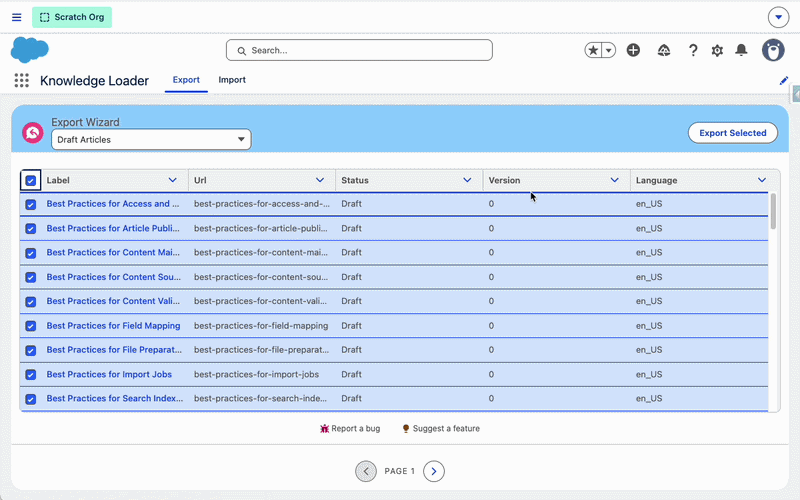
Export from your source org
Choose the Knowledge articles you want to move and download the export.
 Knowledge Loader
Salesforce AppExchange
Knowledge Loader gives you a clean, reliable way to export, import, and migrate articles — complete with images, custom fields, record types, and categories — all inside Salesforce, with no external services.
Designed for admins & consultants
No external services, no custom Apex required. Knowledge Loader runs entirely as a managed package in your Salesforce org.
Source to target
Export articles from your source org, then import them into your target org — including images, custom fields, record types, and categories.
Choose the Knowledge articles you want to move and download the export.
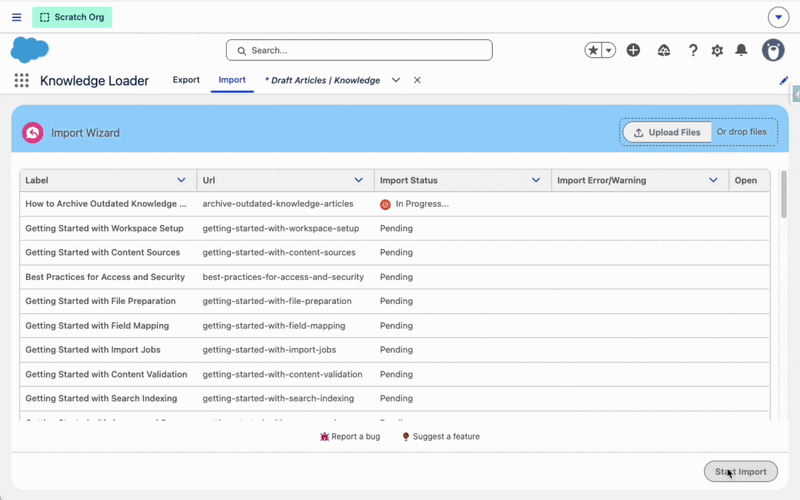
Upload the export and create ready-to-review drafts in the destination org.
User Guide
Tip: Start with a small list view (5–10 articles) to validate results.
FAQ
Does Knowledge Loader override existing articles?
Imported articles are created as Draft. If a draft version of the article already exists, it may be overwritten during import.
Does it export and import custom fields?
Yes. All custom fields are included, except lookup fields.
Does it export and import record types?
Yes. All Knowledge record types are fully supported and carried over.
Does it export and import images in rich text fields?
Yes. All images embedded in rich text fields (added using Insert Image) are retained during export and import.
Does it export and import categories?
Yes. All Knowledge categories are preserved and applied during import.
Knowledge Loader brings a structured and reliable way to move Salesforce Knowledge articles across Salesforce orgs. It eliminates ad-hoc scripts and fragile processes, giving admins and consultants a scalable approach to article management.
The product is built and maintained by Cloud Kraft Ltd.
Questions, feedback, or feature requests? Send a message and we’ll get back to you.
Support